Showing posts with label oracle. Show all posts

June 23, 2015

esProc Codes Dynamic MERGE statement

Databases, such as MSSQL and ORACLE, support updating tables using MERGE statement. But they lack functions for performing set operations. If data structure of the target table is unknown, it is very complicated to use the stored procedure to get its data structure and then compose the dynamic SQL statement. This may need scores of lines of code. For the same reason, it is also not easy to perform the operation in Java and other high-level languages. On the other hand, you must write the code into the database or the application when using stored procedures or the Java language, which is inconvenient for modification and management. In contrast, if esProc is used to help with the operation, the code can be database/application-independent and the architecture of the database or the application will be unaffected and easy to maintain.

Parameters source and target represent two tables with the same structure but different data. The source table will be used to update the target table based on their primary keys. For example, both Table 1 and Table 2 (as shown below) have a primary key consisting of column A and column B:

Below is the MERGE statement for merging Table 1 with Table 2.
MERGE INTO table1 as t
USING table2 as s
ON t.A=s.A and t.B=s.B
WHEN MATCHED
THEN UPDATE SET t.C=s.C,t.D=s.D
WHEN NOT MATCHED
THEN INSERT VALUES(s.A,s.B,s.C,s.D)

The modified Table 1 will be as follows: 

esProc code:

A1,A2: Get the source table’s primary key from the system tables and store it in variable pks; the result is a set - [“A”,“B”]. Databases vary in how to get the primary key, here we’ll take MSSQL as an example.

A3,A4:Retrieve all columns from source, the result is [“A”,“B”,“C”,“D”].
A5:Compose the MERGE statement dynamically. pks.(…) is a loop function for computing members of a set (including the result set) in order. You can use ~ to reference the loop variable and # to reference the loop number in the computation.

A6:Execute the MERGE statement. 

July 21, 2014

Index Performance Comparison between Oracle and esProc

Data table indexing is a common method to accelerate query in Oracle. esProc also provides indexing function. With the actual measurements in the several examples below, we can compare their speed after indexing.

The test is performed on data table T3 with 165 million records. The binary data file being saved in esProc format takes up 14.6 G physical storage,in which fields are shown below:

CREATE TABLE "T3"
( "L11" NUMBER(11,0),
"L4" NUMBER(9,0),
"D4" VARCHAR2(9),
"C4" VARCHAR2(10),
"R2" DATE,
"R4" DATE,
"FL6" NUMBER(9,0),
"FD6" VARCHAR2(6),
"FC6" VARCHAR2(9),
"TL1" NUMBER(2,0),
"TL11" NUMBER(7,0),
"TN1" NUMBER(5,2),
"TN11" NUMBER(23,2),
"TN21" NUMBER(9,2),
"TN31" NUMBER(9,2)
)

Provide the same hardware for both Oracle and esProc with the below environment configuration:
Model for test: Dell Power Edge T610
CPU: Intel Xeon E5620*2
RAM: 20G
HDD: Raid5 1T
Operating system: CentOS 6.4
JDK: 1.6
Oracle version: 11g
esProc version: 3.1

1.Indexing Performance Comparison
4 indexes have been created for both Oracle and esProc. The first 3 are the single-field indexes, and the forth index is the composite indexes.
Note: The test results in this article are all represented in seconds unless otherwise remarked.

As can be seen from the above figure, indexing in Oracle is faster than that in esProc. The main application scenario of esProc is the data computing in BI. In this sector, the data seldom changes. Owing to this, the comparatively slow speed is acceptable since indexing can be regarded as a one-off job.

2.   Single-field Indexing Performance Comparison

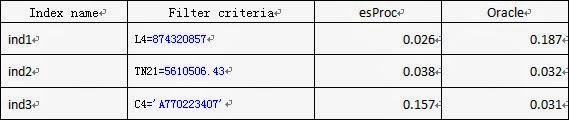
In below discussion, let’s compare the query speed between Oracle and esProc. To start with, let’s compare three single-field indexes. In which, the ind1 is the single-field index for the integer field L4; the ind2 is the single-field index for real number field TN21; and the ind3 is the single-field index for the character field C4. Compare the respective time consumed to query based on filtering criteria.

2.1.  Less than 10 records satisfying the query conditions 


As can be seen from the above figure, compared with Oracle, esProc is faster in handling the integer field, comparable in handling the real number field, and slower in handling the character field.

2.2.  Around 100 records satisfying the query conditions 


As can be seen from the figure, esProc is relatively faster for the numeric field, and the speeds of esProc and Oracle in handling the character field are close.

2.3.  Around 10000 records satisfying the query conditions.


As can be seen from the above figure, esProc runs faster, but the difference is not great.

2.4.  Around 100000 records satisfying the query conditions 


As can be seen from the above figure, esProc runs faster, demonstrating its obvious advantages.

3.   Multi-field Composite Indexing Performance Comparison

3.1.  Less than 10 records satisfying the query conditions 


As can be seen from the above figure, Oracle performance is better.

3.2.  Around 100 records satisfying the query conditions 


As can be seen from the above figure, Oracle performance is relatively better if there are around 100 records satisfying the conditions.

3.3.  Around 10000 records satisfying the query conditions. 


As can be seen from the above figure, esProc performance is obviously superior when the composite indexes of the 3 fields are all the filter criteria and there are 10000 records satisfying the condition.

3.4.  Around 100000 records satisfying the query conditions 


As can be seen from the above figure, esProc performance is better if there are 100000 records satisfying the condition.

4.   Findings on Performance Comparison

1.  Indexing in Oracle is several times faster than that in esProc. Comparatively, esProc more fit for the BI data computing. In most BI scenarios, relatively few data changes, and indexing can be regarded as a one-off job. A bit slowdown in speed is also acceptable.
2.  After indexing, in case a small number (<10000) of records satisfy the query conditions, Oracle is often superior to esProc; In case the number of records is at a medium level (>10000,<100000), their performance is close; In case a great number of records (>100000) return, esProc demonstrates an obvious performance advantage.

July 2, 2014

esProc/Oracle: Single Machine Performance Comparison Test(IV)

7.Analysis

From all use case test we could generally reach the following conclusion on the data characteristics:

1.Oracle normally performs better than esProc with small data volume concurrent computation; sometimes the performance advantage could be as high as several times. But there are exceptions. esProc performs better than Oracle in join computation. 


2.For large data volume, single task computation, esProc's performance is higher than Oracle, sometimes the difference can be several times.


3.Performance degrades significantly both for Oracle and esProc when concurrent number changes from 1 to 2. Oracle still has advantage but the difference with esProc is not too much. 


4.With small data volume concurrent computation, esProc shows stable performance among each task, while Oracle demonstrates great variation among different tasks (normally the difference is up to ten times). However, there are also exceptions. During join computation, Oracle's performance variation is not big among different tasks, and parallel is not valid under such condition.

Possible causes for above data characteristics could be as following:


1.esProc is coded with JAVA, which is an interpret-execution type of language. Thus the efficiency is lower than Oracle, which is coded in native C language.Oracle has sophisticated multi-tier cache mechanism , which perform much better with memory related computation than esProc. Small data volume parallel computation can normally be cached, thus Oracle performs better than esProc in such use cases. 


2.For large data volume, single task computation, esProc's performance is always higher than Oracle. This is due to that large data volume can not be cached, and Oracle's main methods for performance improvement is not applicable. In such situation, esProc's function algorithm is more effective, with an obvious advantage.


3.With small data volume concurrent computation, general performance degrades significantly with the parallel number changes from 1 to 2, and then to 4. This is a signal that the computation exceeds the processing power of CPU. Under such conditions, Oracle still has some advantage, but not too much as compared with esProc. This is because Oracle does not have the time to read the cache, the only advantage is native code. From here we can see that Oracle is basically leveraging cache to improve performance. 


4.Since Oracle's cache mechanism and execution plan can not be managed manually, thus with small data volume concurrent computation Oracle's performance variation is extremely large, sometimes the difference is up to ten times. 


5.Small data volume join is an exception. In this case esProc performs one or several time better than Oracle. Meanwhile the performance variation among each Oracle concurrent task is small, and parallel is invalid, probably also because that Oracle's cache mechanism and execution plan can not be managed manually. Thus, join computation is automatically treated as out-memory computation. Out-memory computation involves competition for hard disk resources, which leads to the lack of performance improvement with parallel processing. esProc's parallel processing is valid, because it can retrieve the small dimension table for in-memory computation, and thus leverage CPU to do multi-core parallel computation. The variation among each task is small, possibly also because that Oracle is automatically treating join as out-memory computation, which does not require cache, and resource is equally distributed among concurrent processes. With join computation, Oracle's advantage with cache disappeared, and the performance advantage with native code is limited, whereas the performance advantage of esProc, as with its use of efficient function algorithm, is now demonstrated. Thus esProc performs better in such case. 


Our basic conclusion for the comparison is: Oracle performs better with small data volume computation, or simple computation with less algorithm. esProc performs better with large data volume, or complicated computations with more algorithm. 


Related:
esProc/Oracle: Single Machine Performance Comparison Test(I)

esProc/Oracle: Single Machine Performance Comparison Test(II)

esProc/Oracle: Single Machine Performance Comparison Test(III)

Please Click here to download the full version。

June 30, 2014

esProc/Oracle: Single Machine Performance Comparison Test(III)

6 Test Use Case

6.1 Small Data Volume Concurrent Scan

This use case tests Oracle and esProc for scanning performance against small data volume tables (files).It's done with a multi-task concurrent access mode.Each task is accessing different table (file). Among them, Oracle is running 16 parallel processes, while esProcis running 4 in parallel. Tests proved thatthis is the parallel level for highest performance.

Data Record,please click here to view the full data:
Note:Unit for time is seconds. Concurrent 2 means 2 SQL process are executed at the same time.The same is for concurrent 4.


Data characteristics:
1. Data with blue background is the peak performance value for this use case.We can see that both Oracle and esPro is running at peak performance with 1 concurrency. Meanwhile in such situation,Oracle's performance is several times higher than esProc.

2. Performance degrades significantly both for Oracle and esProc when concurrency number changes from 1 to 2. Oracle still has advantage but the difference with esProc is not too much.

3. esProc handles each task with equal performance, while Oracle is extremely unstable.

6.2 Large Data Volume Scan
This use case tests Oracle and esProc for their performance during large data volume tables (files) scanning. Test is done in a single task, none concurrent way. 3 Parallel levels are tested, which are 1, 2 and 4 parallel tasks respectively.

Data Record,please click here to view the full table:


Data Property:
1. Oracle is at peak performance with 1 parallel process, and peformance starts to degrade with 2. However, esProc's 4 parallel computation performance is normally higher than 1, sometimes even several times higher, excepting for a few occurance.

2. esProc demonstrates obvious advantage over Oracle in this use case test. This could be better observed with narrow tables and more computation requirements, such as 106, 110 and 114. Use case 129 and 119 are exceptions where Oracle performs slightly better than esProc.

3. esProc is observed to be capable of increasing the computation performance several times with the rise of parallel numer, such as in the case of use case 106, 110, 114, 118, 122, 126 and 130. These are all for narrow table access, and with more computations.

4. In some cases esProc's peformance could also degrade, for example with use case 103, 107, 111, 115, 119, 119, 123 and 127. These are all for wide table access with less computation.

6.3 Small Data Volume Concurrent Grouping

This use case tests Oracle and esProc for grouping computation performance against small data volume tables (files). It's done with multi-task concurrent access mode. Each task is accessing different tables/files.

Data Record,please click here to view the full table:

Note: according to the data volume, esProc can choose to do pure in-memory computation or mix-mode-in-memory-and-out-memory computation. This use case leverages in-memory computation, while the large data volume grouping use case in later part of this report is done with mix-mode-in-memory-and-out-memory computation. Pure in-memory computation has the risk of memory overflow. 

In this case we use the parallel level of 1, 2 and 4 to avoid memory overflow. Green character reflects parallel 1, red character is for parallel 2, and black for parallel 4. Oracle forces a mixed mode computation, which avoids memory overflow. Each task is done with a fixed number of parallel 16 to achieve best performance.


Data Characteristics:
1. Oracle performs better than esPro in general, especially with concurrency 1. With this configuration the performance of Oracle can be several times better.

2. In concurrent task of Oracle is extremely unstable. Performance varies from task to task, usually with several times difference. esProc's performance is stable.

3. Date grouping are all done with two-tier grouping, which, as we could see, Oracle performs better.

6.4 Large Data Volume Grouping

This use case tests Oracle and esProc for grouping computation performance against large data volume tables (files).It's done with none concurrent single task mode for parallel level of 1, 2 and 4.

Data Record,please click here to view the full table:


Data Characteristics:

1. Oracle is at peak performance with 1 parallel process, and performance starts to degrade with 2. However, esProc's 4 parallel computation performance is normally higher than 1, sometimes even several times higher.

2. esProc's performance is several times higher than Oracle in this use case test.

6.5 Small Data Volume Concurrent Joining

This use case tests Oracle and esProc for joining performance against small data volume tables (files).It's done with multi-task concurrent access mode. Each task is accessing different tables/files. Oracle has no performance improvement with parallel computation, and thus no such configuration is used for it. esProc has no performance improvement when running with more than 4 tasks in parallel. Tests are done for 4 parallel tasks.

Data Record,please click here to view the full table:


Data Characteristics:
1. esProc demonstrates a performance advantages of 1 or more times over Oracle.

2. esProc's performance variation among each concurrent task is very small, as compared with Oracle. Oracle's performance variation remains, but is less than in other use case.

3. Parallel mode yields no performance gain for Oracle, while esProc reaches peak performance with 4 parallel tasks.

6.6 Large Data Volume Joining

This use case tests Oracle and esProc for their performance during large data volume tables (files) join. Test is done in a single task, none concurrent way. Among them, Oracle reaches peak performance with 1 parallel task, while esProc is with 4.

Data Record,please click here to view the full table:


Data Characteristics:
1. esProc performs better than Oracle.

2. With multi-tier join, performance degradation for both of them are little.

6.7 Large Data Volume Large Grouping

This use case tests Oracle and esProc for grouping computation performance against large data volume tables (files), when the grouping results are too big to be stored in memory. It's done with none concurrent single task mode for parallel level of 1, 2 and 4 for their respective performances.

Data Record:


Data Characteristics:

1. esProc performs better than Oracle.

2. Oracle is at peak performance with 2 parallel process. esProc is at peak performance with 4.


Related:
esProc/Oracle: Single Machine Performance Comparison Test(I)

esProc/Oracle: Single Machine Performance Comparison Test(II)

esProc/Oracle: Single Machine Performance Comparison Test(IV)

Please Click here to download the full version。

June 29, 2014

esProc/Oracle: Single Machine Performance Comparison Test(II)

5 Use Cases Description

For better understanding, all test logic will be described in SQL.

During the test Oracle will execute the SQL statement directly, whereas esProcwill be running the equivalent code we write to complete the same computation.

5.1 Use Case for Large Data Volume Scan
This use case is large task single machine test. It’s designed to test the computation performance for whole table scan with large data volume. Performance for whole table counting, integer sum, float sum, value sum, integer filter, number filter, character filter, date filter are considered respectively.

SQL as shown below ,please Click here to view the full table:


5.2 Use Case for Large Data Volume Grouping

This use case is large task single machine test. It’s designed to test the grouping computation performance with large data volume, where grouping result record number is small, smaller than the physical memory. Performance for integer grouping, number grouping, character grouping and date grouping are considered respectively.

SQL as shown below ,please Click here to view the full table:


5.3 Use Case for Large Data Volume Large Grouping

This use case is large task single machine test. It’s designed to test the grouping computation performance with large data volume, where grouping result record number is large, larger than the size of the physical memory, and thus the computation cannot be completed within the memory.


5.4 Use Case for Large Data Volume Join

This use case is large task single machine test. It’s designed to test the external join computation performance with large data volume. Performance for integer, number, character join is considered respectively, including single-tier join and milti-tier join.

SQL is shown blow,please click here to view the full table.


5.5 Use Case for Small Data Volume Concurrent Test

This use case is to test the multi-task concurrent computation performance with small data volume. Each task of the concurrent process is accessing different physical tables/files to avoid OS cache. Tests were done for scanning, grouping and joining, with the same use cases as 5.1, 5.2, 5.4 above. However the data volume is small (See data volume part).

Tests were done for single task, dual tasks concurrent, and four tasks concurrent scenarios respectively.

Related:
esProc/Oracle: Single Machine Performance Comparison Test(I)

esProc/Oracle: Single Machine Performance Comparison Test(III)

esProc/Oracle: Single Machine Performance Comparison Test(IV)

Please Click here to download the full version。

June 25, 2014

esProc/Oracle: Single Machine Performance Comparison Test(I)

1.Testing purposes

Testing esProc and Oracle on the same hardware for single machine performance, to compare the two for performance difference either in large data volume single task computation or small volume multiple tasks concurrent computation use cases.

2.Testing contents and methods

Data volume: 
Small data volume: single fact table around 10G. To avoid the testing results being affected by operating system cache, multiple concurrent request will be accessing different fact tables.

Large data volume: single data table is about 100G.

Algorithm category:
Testing the performance of several typical SQL algorithms, including data scan, grouping, join and large grouping, etc.. Note that the use of these simple algorithms is for better understanding and direct comparison of the performance, not because esProc and SQL are identical to each other. In fact, the two of them focus on different things. esProc is good at procedure computation with more 
complicated business logic, while SQL is for computation of average complexity. 

Complicated algorithm can be realized with different SQL execution plan, which is out of manual control, and thus not good for comparison. We'll not do such test.

Category of Use Cases:
Each algorithm are tested with multiple use cases according to the width of the table, data types, etc..

Among them, the purpose for large grouping use cases is to test the scenario when the resulting data sets of the grouping is too large to be fit in the memory. So this report will only test the situation of parallel computing with 100G large data volume, rather than concurrent computing with small data volume.

Note: the article esProc Oracle Single Machine Performance Comparison Process is an appendix of this report. Please refer to it for details such as data structures, test code, test reproduction, etc..

3.Testing Environment

Testing Machine:Dell Power Edge T610

CPU:Intel Xeon E5620*2

RAM:20G

HDD:Raid5 1T

Operating System:CentOS 6.4

JDK:1.6

Oracle Version:11g

esProc Version:3.1

4.Data Description

The volume of the data is decided by the amount allowed by exported text file.
During the single machine test, esProc uses proprietary file format.

As the purpose is mainly to test big data computation and whole table scan performance, no primary key or index is build for any table in the database. For purpose of big data computation test, the primary key field described in data structure simply means that this field is the logic primary key. No data repetition is allowed. Primary key is not physically built. 

4.1.Data tables and the associated tables

Facts TableT1, T11, T12, T13
Wide table T1, T11, T12, T13, is to simulate the fact table with large numbers of data fields. Total number of designed fields is 100. The four tables have identical structures. T11, T12, T13 are used for small data volume multi-task concurrent access to different tables to avoid system cache.

Fact Table T2, T21, T22, T23
Narrow tables T2, T21, T22, T23 are used to simulate fact tables with less fields. Total number of designed fields is 11. The four tables have identical structures. T21, T22, T23 are used for small data volume multi-task concurrent access to different tables to avoid system cache.

Fact tables are the main data source for this test, and are used in scan, group, join computation. Tests are done for both large and small data volumes, with are controlled by inserting different rows of records.

Dimensional table DL2, DL6, DD2, DD6, DC2, DC6
Dimension table is only used to test the join (and multiple joins) use cases. These dimension tables and fact tables will be joined, so will the dimension tables. These tables have fixed data volume.

4.2.Data volume

Numbers in the table stands is the number of record rows, not the number of occupied spaces in bytes.


Note: the goal for large data volume single machine test is to test the performance when the memory used by the data is well above physical memory. Our test standard is the size of a single fact table to be approximately 5 times the size of physical memory. The memory used by dimension table is far below the physical memory. Actual number of record rows used could be adjusted according to the configuration of the machine.

The goal for small task concurrent single machine test is to show the performance when memory occupied by the data is less than the physical memory, and the computation could be done completely in the memory. Our test standard is to use a single fact table of 50% the size of the physical memory. Memory used by dimension table is far less than the physical memory. Actual number of record rows used could be adjusted according to the configuration of the machine. T11/T12/T13 and T21/T22/T23 are only used for small data volume multi-task concurrent test.

To make sure that esProc and Oracle is computing against exactly the same data, we will export the data generated in Oracle to a binary file format defined by esProc, as the data source for esProc during the test. 


Related:
esProc/Oracle: Single Machine Performance Comparison Test(II)

esProc/Oracle: Single Machine Performance Comparison Test(III)

esProc/Oracle: Single Machine Performance Comparison Test(IV)

Please Click here to download the full version。

April 13, 2014

esProc Optimizes the Performance of Oracle Datasource Report

Description of the Issue

Some reports in a project suffered from very low speed. Despite various iReport and Oracle database optimizations, the situation is not yet satisfying. For example, there is a detail report, involving large data volume, many (dozens of) data tables, and frequent inter-table join (including self join). This report includes inter-cell computing expressions (ratios and sum).
Here are some complicated data set SQL statements from this report:
(select *
from (select syb.org_abbn as syb,
max(xmb.org_abbn) as xmb,
sub.org_subjection_id as sub_id,
oi.org_abbn as org_abb,
rm.rec_notice_org_id,
rm.synergic_team as xz_team,
xzdw.coding_name as xz_org,
l.requisition_cd as req_cd,
l.requisition_id as req_id,
l.note as req_note,
nvl(decode(l.ops_content6,
2000200012,
                                  'Yes',
2000200011,
                                  'No'),
                           '') as sflj,
--too long, most part from the select clause is omitted.
fromlcr l
left join lcrrm on rm.requisition_id =
l.master_bill_id
andrm.table_type = '0'
andnvl(rm.bsflag, 0) != 1

left join cos sub on l.org_id = sub.org_id
andnvl(sub.bsflag, 0) != 1
left join coioi on oi.org_id = sub.org_id
andnvl(oi.bsflag, 0) != 1

--too long, most part from the join is omitted.
wherel.table_type = '1'
andl.requisition_state = '0101020304'
andnvl(l.bsflag, 0) != 1
                                     andto_char(l.back_date, 'yyyy-MM-dd') between '2012-01-01' and
       '2012-04-25'
group by l.requisition_id,
l.note,
l.requisition_type,
sub.org_subjection_id,
syb.org_abbreviation,
rm.rec_notice_org_id,
oi.org_abbreviation,
--too long, most of the group by fields are omitted
                ) a-- main query a
LEFT JOIN crviewve-- viewve
            ON ve.requisition_id = a.req_id

If you check these SQL statements carefully, you’ll find immediately that there are too many tables associated, including a lot of self-join. Meanwhile, there are many sub query embedded in it. To make this worse, it is also associated with a view, which is very complicated.

Currently the data presentation time for this report, when querying against 4 months data volume, is 6 minutes 42 seconds. This is far from what the end-user could accept.

As mentioned before, the report has been optimized several times. The data set SQL and report expressions have gone through careful tuning process. The above data set SQL is very complicated, with no room for further optimization. Meanwhile, as real time query, the use of pre-computed intermediate table for acceleration is also not a feasible approach.

After analyzing the report we find that it involves two stages: 1) the data loading stage (data set SQL execution stage), and 2) report computation and presentation stage. The first stage requires 5 minutes, and the second stage requires more than 1 minute. The reason for the slowing running of data set SQL is caused by the extremely low efficiency of the join in two sub queries (main querya and view ve).

Thus we find a new approach for optimization: we’ll mainly optimize the data set loading by improving the efficiency of SQL join. At the same time, we’ll optimize the computation and presentation part.

Resolution Process

The esProc approach for resolution of this issue is as following:
1. Split the data set SQL of the report
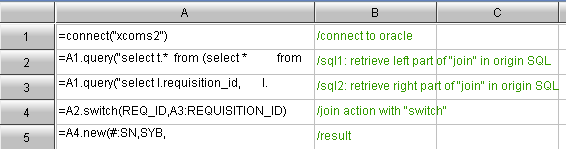
As previously mentioned, the join between the two sub queries is causing the slow running of the SQL. We use esProc to execute the SQL for two sub queries, and then complete the association in esProc with “switch” (“switch” or “join” is used accordingly) statement. After test run we find significant improvement on efficiency.
esProc


2. Eliminate inter-cell computing from the report
The inter-cell computing (ratios and sum) part in the original report template is moved into esProc, thus the report generation could be speed up due to the removal of grid scanning.

3. Return the result set to the report all together
After all data preparation is done through esProc, the result will be returned to reporting tool all together. Once data source is received, the presentation will be done directly, without any computation (such as inter-cell computing) that might affect efficiency.


The complete codes for esProc are as following:


Solution Result

Through the above process, total report presentation time is radically reduced from the original 6 minutes 42 seconds to 57seconds - less than 1 minute. The benefit of this optimization is remarkable. This is what the end-user is happy to see.

Conclusion

In the process of the problem resolution, we found that the main query a and view ve in the original SQL statement requires only 10 to 40 seconds when executed in Oracle separately. However, a join between a and view ve requires several minutes. This is because Oracle cannot always find a reasonable approach when automatic execution plan is used. If human interference is required, it will be very tedious and time consuming.

esProc could improve the performance, because we know that ve is actually a dimensional table of a. Thus we can use a particular method of “switch”. This allows human definition of the execution plan for complicated query. In combination with Oracle’s basic query statement, it will speed up the process significantly.